Supercharge your teams’ productivity with Wrike’s AI agents — an easy, no-code solution that automates and accelerates mundane tasks. Learn how.

Project Schedule Template

Use our project scheduling template to break large projects into actionable items, assign due dates, and track team progress.
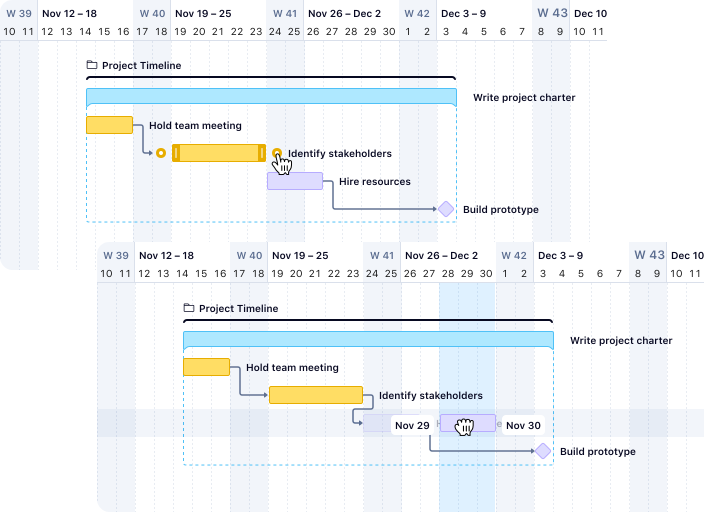
Wrike Gantt chart with drag-and-drop task scheduling and timeline.

Why use Wrike’s project schedule template to plan work?

Wrike’s project schedule template gives you real-time visibility into timelines and automates repetitive scheduling tasks so your team stays aligned from kickoff to delivery. 

Keep your team accountable with clear ownership

Every task in this project management schedule template has a defined owner, due date, and priority level. When responsibilities and requirements are visible to everyone, there is no confusion about who is doing what or when it needs to be done.

See your full timeline in one view

The built-in project planning calendar and Gantt chart give you a visual map of your entire project. Spot bottlenecks before they cause delays, see how tasks connect to each other, and make scheduling decisions based on real data.

Wrike project scheduling assignee picker dropdown with task timeline and user list.

Adjust plans without losing progress

Projects change. When they do, our project work schedule template updates dependencies automatically. Move one deadline and watch the rest of the timeline adjust instantly, keeping your schedule accurate without hours of manual rework.

Wrike task view embedded in Outlook for project scheduling.

How to use Wrike’s project scheduling template

Break your project down into tasks

This project management schedule template helps break down large projects into smaller steps and assign them to the right people. Everyone will know what they are responsible for from day one.

Map dependencies between tasks

Define which tasks depend on others, so your team works in the right order. When one task finishes, the next one is ready to go, keeping your project moving forward without bottlenecks.

View progress with the Gantt chart

The visual project planning calendar shows every deadline and milestone in one place. Adjust dates as things change and the timeline updates itself automatically, keeping the whole team in sync.

Track milestones and deadlines

Each milestone appears on your Gantt chart and dashboard, giving stakeholders a quick way to check progress without digging through individual tasks.

Monitor workload across your team

See who is overloaded and who has capacity. The workload view inside this template for project management schedule helps managers redistribute tasks before burnout become a problem.


Put plans into action with Wrike

Free 14-day trial. Easy setup. Cancel any time.

Project schedule example: what a typical setup looks like

A marketing team launching a product campaign might set up their project schedule template with four phases: research, content creation, review, and launch. Each phase contains individual tasks with owners, deadlines, and dependencies linking them in sequence. 


The research phase feeds into content creation. Content creation feeds into review. And review feeds into launch. When the research deadline shifts by two days, every downstream task adjusts automatically. The project manager sees the updated timeline on the Gantt chart without having to recalculate a single date. 


This project schedule example shows how teams in any industry can use the same structure. Replace ‘content creation’ with ‘foundation pouring’ for construction, or ‘sprint planning’ for software development. The framework adapts to the work.

Who benefits from a project management schedule template

Marketing teams

Coordinate campaign timelines across content, design, and paid media. A project schedule template gives every contributor a shared view of what’s due, what’s blocked, and what’s coming next.

Professional services teams 

Map client deliverables to internal workstreams. When the client changes scope, update the schedule once and let dependencies handle the rest.

Product and engineering teams 

Plan sprints, track release milestones, and connect development work to go-to-market timelines in a single workspace.

Operations and PMO teams 

Standardize scheduling across departments. Use this project work schedule template as a repeatable framework that new projects can adopt on day one.

What makes Wrike's project schedule template different

Wrike is trusted by more than 20,000 organizations worldwide, including Siemens, Walmart, and NVIDIA. Our project schedule template is built on the same platform these teams use to deliver their most consequential work.

Real-time collaboration

Real-time collaboration

Comments, approvals, and file sharing happen inside the task, not in a separate thread. Every conversation stays connected to the work it references.

Automated workflows

Automated workflows

Set rules that move tasks to the next stage, notify owners, or flag overdue items without manual intervention. Your project keeps moving even when you’re focused elsewhere.

Custom dashboards

Custom dashboards

Build a reporting view that shows exactly what your stakeholders care about: on-time delivery rates, task completion by team, upcoming milestones, or budget status.

Cross-project visibility

Cross-project visibility

When your team runs multiple projects at once, Wrike connects schedules across all of them. See how a delay in one project affects timelines in another — before it becomes a problem.

Ready to try this template in Wrike?

Free 14-day trial. Easy setup. Cancel any time. 

FAQ

How to install this template in your account

You might be interested in these templates

Unlock the power of Wrike’s templates

Use our smart search tool to explore versatile templates, designed for easy customization and streamlined project management.

Try asking:

Wrike enhances its website search experience using Google's Vertex AI Search and Conversation generative AI service. Users are cautioned that generative AI might produce inappropriate, inaccurate, offensive, or unintended results, and are advised against submitting explicit, harmful, offensive, or illegal content as search input. Neither Wrike nor Google uses your search inputs to train its machine learning models or for advertising purposes, but search activities may be collected and/or stored via cookies in accordance with our Privacy Policy if you previously registered on our website. These cookies can be deleted through your browser settings. Wrike's search service is not designed to be used in connection with your personal data or any sensitive data of any kind, which users must refrain from inputting.